
Reason for bricking
Reason for this is anti-roll back feature.because you flashed lower version than current version ex:miui 10.2 to 10.1. It is mostly happen to the people who flashed custom rom then reflashed miui.This result in phone has no battery even mi logo not showing up.Don't panic each problem has its own solution.In this article we are gonna see how to unbrick redmi 4/4x by using edl method ir. test points
Requirements
1. Redmi 4/4x fastboot santoni global rom(.tgz) from the link here
2. Download MI Flash tool from here
3. Minimal ADB and Fastboot installer
4. Qualcomm QD loader driver software
Prerequisites
- Install Mi Flash tool you have downloaded.
- Install Minimal Fastboot & ADB files.
- Extract the downloaded MIUI Fastboot ROM .tgz file. Winrar or 7zip may come in handy for this task.
- Prepare the USB data cable. Using the original/stock cable – the one shipped with your phone – is strongly recommended.
Flashing procedure
Step 1: Plug your bricked phone into pc,Then go to device manager.it will show your bricked phone as unknown device manager(despective failed)
Step 2: Unplug the cable and open the back panel of your mobile


Step 4: Disconnect battery from main board and locate the Test points

Note: You need a piece of wire or twizzer to short the test points to enter edl mode
Step 5: Now short Test points with wire or twizzer then connect to pc(remove the short in testpoints after 2 secs) keep device manager opened wait for hardware changes

Step 6: You will get the new driver qualcomm qs usb 9008
Back panel process is almost over
Steps to Flash rom
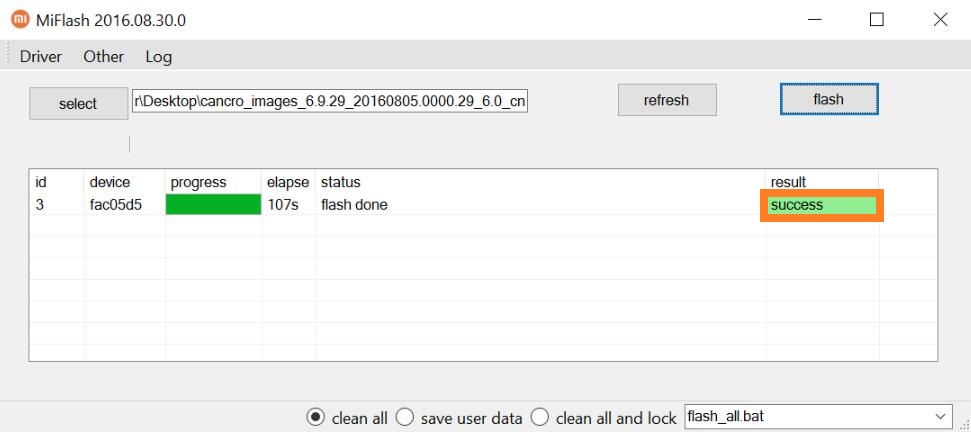
1.Open mi flash tool then select the folder where Rom image is Extracted
2. Click the refresh button your devies is detected as com3 or com 4 or something like in below image.

3. Click the Flash button wait for 5 min until sucesss message appeal
4. Unplug usb cable your phone will vibrate now connect battery to main board switch on it
5.Mi logo will appear then powered by android it will take time to boot so wait fot it
6. If your phone stuck on mi logo(soft-bricked) you have plenty of options like fastboot mode recovery that tutorial come next.
7.screw the panel and rejoint back panel to the mobile then start using your andriod make use of it
8. If you still not recover phone like error message comment below i will help you
No comments
Post a Comment